Posts

CREATE WEB-FORM USING LIGHTNING WEB COMPONENTS SALESFORCE

Image
What is a Web Form? A web form (also called an HTML form) allows users to input data that is sent to a server for processing. These forms are commonly used for various tasks, such as submitting shipping or credit card information for orders, or querying search engines. They can include elements like checkboxes, radio buttons, or text fields, resembling paper or database forms. Example of a Web Form In this example, we will create a web form using  Lightning Web Components (LWC)  in Salesforce to submit data to an object. Step 1: Your HTML Page ( webform.html ) This HTML page contains the structure of the form. We will use the  lightning-record-form  component to automatically generate a form based on the fields of an object. html < template > < lightning-messages > </ lightning-messages > < lightning-record-form object-api-name = {accountObject} fields = {myFields} onsuccess = {handleAccountCreated} > </ li...

Utilizing a Generic Pagination Class in Lightning Web Components - Part 2

Image
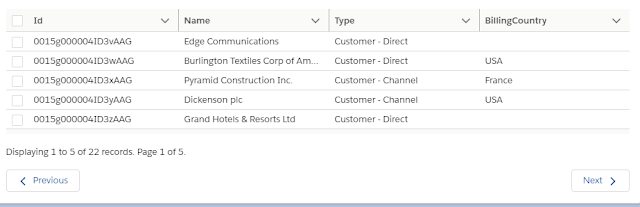
When displaying large datasets in Salesforce, particularly with the lightning-datatable component, handling data effectively is key to providing a smooth user experience. The lightning-datatable component supports various data types and features. However, when rendering more than 100 rows of data on a single page, implementing pagination or infinite scrolling becomes essential to enhance performance and usability. Below is an example of implementing pagination in Salesforce Lightning Web Components. HTML File: oppListView.html < template > < lightning-card title = "Opportunities" icon-name = "action:preview" > < div class = "slds-m-around_medium" > < h2 class = "slds-text-heading_medium slds-m-bottom_medium" > {cardTitle} </ h2 > < div style = "height: 180px;" > < lightning-datatable key-fi...

Long-Running Callouts with Multiple Apex Continuations

Image
Salesforce provides the Continuation class in Apex to handle long-running requests to external web services without hitting the limits imposed on synchronous requests. Traditionally, Salesforce only supported Continuations from Visualforce pages , but since the Summer '19 release , both Aura and Lightning Web Components (LWC) can also invoke Apex Continuation methods. This functionality allows handling multiple asynchronous callouts, which no longer count against the 10 synchronous callout limit that exceeds five seconds. What is a Continuation? A Continuation is a pattern where an Apex method makes a request to an external service but does not wait for the response immediately. The request "forgets" about the response and allows Salesforce to process it asynchronously. Once the response is received, a callback method is invoked to handle the data. Example: Making Multiple Callouts with Apex Continuation Below is an example that demonstrates how to send multiple long-...

Understanding Events in Aura

Aura events in Salesforce Lightning are crucial for enabling communication between components. There are two primary types of events in Aura: Application Events and Component Events . Both types follow propagation patterns similar to DOM event handling, such as capture and bubble phases. Here’s a breakdown of how these events function and propagate within the Aura framework. 1. Application Events Application events follow a publish-subscribe model, meaning that once an event is fired, any component that has registered a handler for that event will be notified. The propagation of application events follows three phases: capture , bubble , and default . Phases of Application Event Propagation: Event Fired : An application event is fired by a component. This component is known as the source component . Capture Phase : The framework begins executing the capture phase, starting from the application root and moving down to the source component. Each component along this path has the cha...

Understanding Modals/Dialog Windows in Web Pages

Modals, also known as modal windows or lightboxes, are essential components in web design that create a focused experience for users. A modal window disables the main window while keeping it visible, acting as a child window in front of it. This approach allows users to complete specific tasks without needing to display all the information on the main screen. While these messages aren't strictly locked, users can click outside the modal to dismiss it. Let's Code Together! In this section, we will create a simple generic modal component using Lightning Web Components (LWC). 1. HTML Template: genericModal.html < template > < template if:true = {showModal} > < section role = "dialog" tabindex = "-1" aria-labelledby = "modal-heading-01" aria-modal = "true" aria-describedby = "modal-content-id-1" class = "slds-modal slds-fade-in-open" > < div class = "...

Utilizing a Generic Pagination Class in Lightning Web Components - Part 1

Image
Understanding Pagination: Purpose and Implementation What is the Purpose of Pagination? Pagination, also known as paging, is a crucial technique used in web applications to enhance user experience. It involves dividing the content of a website or document into discrete pages. This process is essential for efficiently managing large sets of data, as it allows for the display of information across multiple pages within a single web interface. Pagination serves several key purposes: Improved Navigation: Users can easily navigate through content without being overwhelmed by a single long list. Enhanced Performance: By loading only a subset of data at a time, pagination helps to improve load times and overall performance. Better User Experience: With clear page navigation, users can find and access the information they need quickly and efficiently. Pagination can be implemented either client-side or server-side, depending on the specific needs of the application. Let's Code Together!...

Communicating from the Child Component to the Parent Component in LWC

Communicating from the Child Component to the Parent Component in LWC In Lightning Web Components (LWC), communication between components is essential for building interactive applications. In this post, we’ll explore how to communicate from a child component to a parent component using events, illustrated with a real-time example. Step 1: Create the Parent Component First, let's create the parent component called parentComponent . This component will manage a counter that can be incremented or decremented through actions performed in the child component. 1. Update parentComponent.js Here's the JavaScript code for the parent component: import { LightningElement } from 'lwc' ; export default class Parentcomponent extends LightningElement { counter = 0 ; // Increase the counter value when the user clicks onClickAdd ( ) { this . counter ++; } // Decrease the counter value when the user clicks onClickSub ( ) { this . cou...